
SUMMARY
Spatial Computing: What Developers Need to Know in 2026
Explore the latest advancements in spatial computing, its impact on application development, and essential skills for developers in 2026.
Keywords: Spatial Computing, AR/VR Development, Immersive Tech
TABLE OF CONTENTS
1 Introduction to Spatial Computing in 2026
2 The Evolving Landscape: Core Concepts and Impact
3 Essential Developer Skills for the Spatial Era
4 Overcoming Technical Challenges in Spatial Development
5 Practical Steps: Building Your First Spatial Application
6 Conclusion and Future Outlook
INTRODUCTION
1. Introduction to Spatial Computing in 2026
Welcome to 2026, where the digital and physical worlds are merging at an unprecedented pace. The buzzword that encapsulates this profound shift is spatial computing. It represents more than just augmented reality (AR) or virtual reality (VR); it is a paradigm where applications understand and interact with the three-dimensional space around us, blending digital content seamlessly into our physical environments. For developers, this signifies not just a new frontier, but a fundamental re-imagining of how we build and interact with software.
In recent years, significant strides have been made, particularly with the introduction of powerful, consumer-ready devices like Apple Vision Pro and Meta Quest 3, which have democratized access to immersive experiences. These devices, along with advancements in AI and sensor technology, have laid the groundwork for a truly spatial internet. By 2026, spatial computing is transitioning from early adoption into broader commercial and industrial applications, demanding a new set of skills and approaches from the development community.
“Spatial computing is not just another platform; it’s a foundational shift that redefines human-computer interaction, moving from flat screens to immersive, contextual experiences.”
— Kwonglish Analysis, 2026
The market for spatial computing is experiencing explosive growth. According to recent industry reports, the global AR/VR market, a significant component of spatial computing, is projected to exceed $100 billion by 2026, with enterprise adoption driving a substantial portion of this expansion. This growth is fueled by advancements in hardware miniaturization, increased on-device processing power, and sophisticated spatial mapping algorithms that enable persistent digital content in real-world spaces. Companies across sectors, from manufacturing and healthcare to retail and education, are investing heavily in spatial solutions to enhance productivity, training, and customer engagement.
KEY POINT
Spatial computing is the next major computing paradigm, integrating digital information directly into our physical environment. Its rapid adoption in 2026 across various industries signals a critical moment for developers to adapt and innovate.
This post aims to equip developers with a comprehensive understanding of spatial computing in 2026. We will explore its core concepts, analyze its transformative impact on application development, identify the essential skills needed to thrive, address common technical challenges, and provide practical guidance on getting started. Whether you are a seasoned software engineer or a budding developer, understanding spatial computing is no longer optional – it is crucial for staying relevant in the evolving tech landscape.
CORE CONCEPTS
2. The Evolving Landscape: Core Concepts and Impact
Defining Spatial Computing in 2026
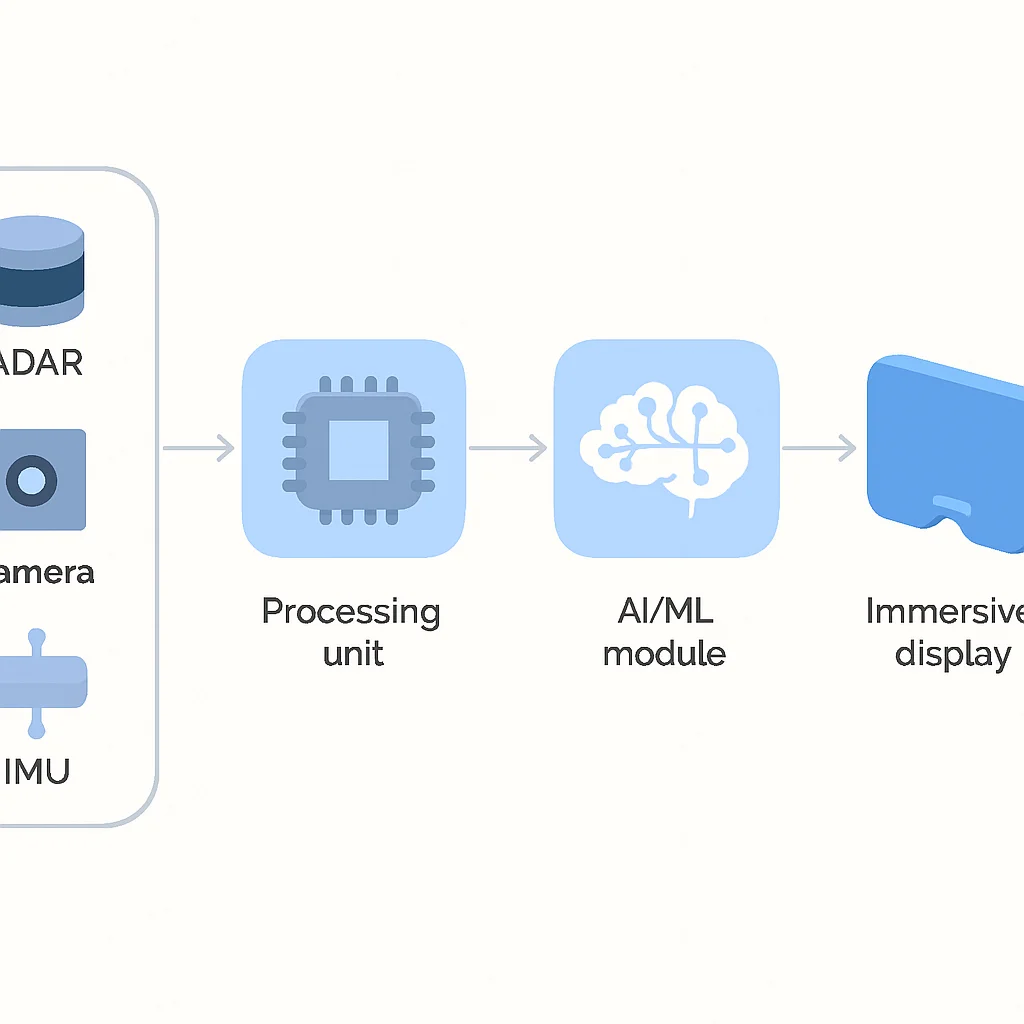
At its core, spatial computing refers to a computer’s ability to understand and interact with the real world in three dimensions, placing digital objects and experiences within that physical context. Unlike traditional computing, which primarily deals with 2D interfaces on screens, spatial computing leverages advanced sensors, computer vision, and AI to perceive, map, and track the user’s environment, creating a persistent digital layer.
Key technologies underpinning this paradigm include:
- Advanced Sensors: Lidar scanners for depth sensing, high-resolution cameras for environmental understanding, IMUs (Inertial Measurement Units) for tracking motion, and microphones for spatial audio processing. Devices like the Apple Vision Pro boast an array of 12 cameras, 5 sensors, and 6 microphones, providing a rich data stream for spatial awareness.
- Computer Vision & AI: Algorithms that process sensor data to build a real-time, 3D mesh of the environment, identify objects, track hand gestures, and understand gaze. This allows digital content to accurately occlude or be occluded by real-world objects.
- 3D Rendering Engines: Powerful graphics processors and optimized software (e.g., Unity, Unreal Engine, RealityKit) capable of rendering photorealistic 3D models and effects in real-time, often at high frame rates (e.g., 90Hz or 120Hz) to ensure a smooth, immersive experience.
- Spatial Anchoring & Persistence: The ability to “anchor” digital content to a specific point in the physical world and have it remain there even when the user leaves and returns. This is crucial for collaborative spatial experiences and persistent digital workspaces.
Impact on Application Development
The shift to spatial computing profoundly impacts how applications are conceived, designed, and developed. We are moving away from the flat, two-dimensional constraints of screens to an unbounded, three-dimensional canvas. This means:
Key Shifts in App Development
3D User Interfaces (UI) — Traditional UI elements (buttons, menus) evolve into interactive 3D objects that can be manipulated directly in space.
Natural Interaction — Input moves beyond mouse and keyboard to intuitive gestures, gaze tracking, voice commands, and even brain-computer interfaces (BCI) in early experimental stages.
Contextual Awareness — Applications can understand the user’s physical environment and adapt content accordingly, providing truly personalized and relevant experiences.
Immersive Storytelling — New opportunities for narrative experiences that envelop the user, blurring the lines between observer and participant.
Consider the transformation across various application categories:
- Enterprise & Productivity: Instead of multiple monitors, knowledge workers might collaborate in a shared virtual workspace with persistent 3D models and data visualizations floating around them. Architects can walk through their designs with clients in real-time, adjusting elements on the fly. Training simulations become hyper-realistic, reducing costs and risks. For example, a manufacturing firm might use spatial apps to overlay digital instructions onto machinery for maintenance, reducing error rates by 30% and training time by 40% compared to traditional manuals.
- Entertainment: Gaming evolves beyond screens into fully immersive worlds. Live events, from concerts to sports, can be experienced from impossible angles or even within the action itself. Imagine watching a basketball game with virtual players on your living room floor.
- Education: Complex scientific concepts, historical events, or anatomical structures can be explored as interactive 3D models, offering a level of engagement and understanding previously impossible. Medical students can practice surgery on holographic patients, while history students can walk through ancient Rome.
- Retail & E-commerce: Customers can virtually try on clothes, place furniture in their homes before buying, or explore virtual showrooms. This reduces returns and enhances purchasing confidence. A leading furniture retailer reported a 15% increase in conversion rates for products viewable in AR.
KEY POINT
Spatial computing is driving a fundamental shift from 2D screen-based interaction to 3D immersive experiences. This opens up entirely new categories of applications and redefines existing ones across nearly every industry sector, demanding developers to think spatially from the ground up.
DEVELOPER SKILLS
3. Essential Developer Skills for the Spatial Era
As the landscape of computing evolves, so too do the demands on developers. Building for spatial environments requires a blend of traditional software engineering expertise and new, specialized skills. Here’s what you need to focus on in 2026 to stay ahead:
Mastery of 3D Development Environments
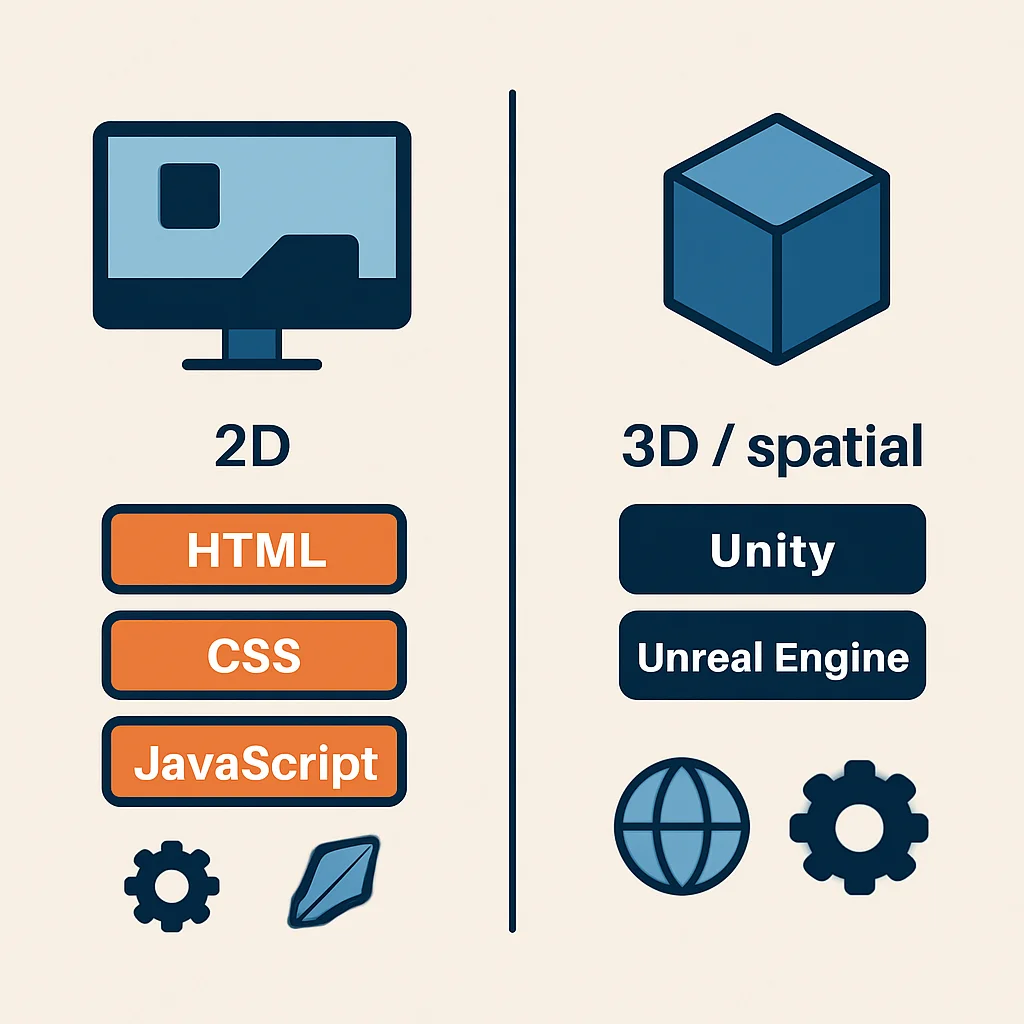
The cornerstone of spatial development lies in proficiency with 3D engines and frameworks. These tools provide the necessary infrastructure for rendering, physics, animation, and interaction within a 3D space.
- Unity: Remains a dominant force, especially for cross-platform AR/VR/MR development. Its C# scripting environment and extensive asset store make it highly versatile. Many enterprise spatial applications, from industrial training to architectural visualization, are built on Unity due to its robust ecosystem and ease of deployment to various devices like Meta Quest, HTC Vive, and even Apple Vision Pro (via PolySpatial).
- Unreal Engine: Preferred for high-fidelity, graphically intensive experiences. Its C++ backend and powerful rendering capabilities are ideal for AAA games, cinematic experiences, and advanced simulations. Features like Nanite and Lumen significantly reduce the complexity of rendering complex scenes, making it attractive for cutting-edge spatial applications.
- Apple’s RealityKit/visionOS SDK: For developers targeting Apple Vision Pro, deep knowledge of Swift, SwiftUI, and RealityKit is crucial. RealityKit is optimized for Apple’s ecosystem, providing seamless integration with its hardware and spatial features. This platform emphasizes intuitive, gaze- and gesture-based interactions.
Spatial UI/UX Design Principles
Designing for spatial interfaces is fundamentally different from 2D screens. Developers need to understand principles like:
- Depth and Scale: How objects appear and behave based on their distance from the user. Understanding comfortable interaction distances and the appropriate scale for digital content is vital to prevent user fatigue or discomfort.
- Natural Interaction: Designing for gaze, hand gestures, and voice. This includes understanding common gestures (e.g., pinch-to-select on Vision Pro), voice commands, and how to provide clear visual feedback for these interactions.
- Spatial Audio: Using 3D audio cues to enhance immersion and guide user attention. For instance, an important notification might emanate from a specific direction, drawing the user’s focus without visual clutter.
- Environmental Context: How digital content interacts with real-world objects, including occlusion, shadows, and lighting. This is crucial for achieving a sense of presence and believability.
“The best spatial experiences feel intuitive, almost magical, because they respect the physics and psychology of human perception in a 3D world.”
— Kwonglish UI/UX Research, 2026
Auxiliary Skills: AI, Cloud, and 3D Art
Beyond core engine work, several complementary skills are becoming increasingly important:
- AI/Machine Learning: Essential for advanced spatial understanding, object recognition, predictive user intent, and dynamic content generation. For example, AI can analyze a user’s posture and surroundings to suggest optimal placement for virtual objects, or recognize emotions to tailor an experience.
- Cloud Computing & Edge Processing: For complex simulations, real-time multi-user experiences, or handling massive datasets (e.g., persistent world anchors), cloud services (AWS, Azure, Google Cloud) and edge computing become critical. This offloads heavy computation from the device, ensuring smooth performance.
- Basic 3D Modeling & Animation: While not every developer needs to be a 3D artist, a fundamental understanding of tools like Blender or Maya, and concepts like poly counts, UV mapping, and rigging, will greatly aid in asset integration and optimization. Being able to create simple placeholder assets or modify existing ones streamlines the development process.
Start with an Engine
Pick a leading 3D engine like Unity or Unreal Engine and commit to mastering its fundamentals. Focus on scene creation, object manipulation, and basic scripting.
Dive into Spatial UX
Study human-computer interaction principles for 3D environments. Experiment with gaze, gesture, and voice inputs. Understand comfort zones and motion sickness prevention.
Build Small Projects
Start with simple projects: a virtual object placement app, an interactive 3D menu, or a basic spatial game. Iterate and learn from real-world testing.
KEY POINT
The most successful spatial developers in 2026 will possess a hybrid skill set: strong traditional programming foundations, deep expertise in 3D development tools, and a keen understanding of human-centered spatial design principles. Continuous learning in areas like AI and cloud integration will provide a competitive edge.
CHALLENGES & SOLUTIONS
4. Overcoming Technical Challenges in Spatial Development
Developing for spatial computing introduces a unique set of technical and design challenges. Addressing these effectively is crucial for delivering compelling and comfortable user experiences.
PROBLEM 01
Performance Optimization: Real-time Rendering and Latency
Rendering complex 3D environments at high frame rates (e.g., 90-120 frames per second) on mobile or untethered devices is computationally intensive. High latency (delay between user action and visual response) can cause motion sickness and break immersion.
SOLUTION — Efficient Asset Management and Rendering Techniques
Developers must employ aggressive optimization strategies:
- Level of Detail (LOD): Render simplified versions of models when they are far from the user.
- Occlusion Culling: Don’t render objects that are hidden behind other objects.
- Batching: Group similar objects to reduce draw calls.
- Texture Compression: Use efficient texture formats and resolutions.
- Cloud Rendering: Offload heavy rendering tasks to remote servers for extremely complex scenes, streaming the result back to the device.
// Example in Unity (C#) for LOD setup
// Attach this script to a GameObject with multiple mesh renderers
// representing different LOD levels.
using UnityEngine;

public class SimpleLODManager : MonoBehaviour
{
    public MeshRenderer[] highDetailRenderers;
    public MeshRenderer[] lowDetailRenderers;
    public float lodDistance = 10f; // Distance threshold for LOD swap

    private Transform playerCamera;

    void Start()
    {
        // Find main camera at start
        playerCamera = Camera.main.transform;
        if (playerCamera == null)
        {
            Debug.LogError("Main Camera not found! LOD will not function.");
            return;
        }
        UpdateLODState(); // Initial check
    }

    void Update()
    {
        if (playerCamera == null) return;

        float distance = Vector3.Distance(transform.position, playerCamera.position);

        if (distance > lodDistance)
        {
            SetLOD(false); // Use low detail
        }
        else
        {
            SetLOD(true); // Use high detail
        }
    }

    void SetLOD(bool isHighDetail)
    {
        foreach (var r in highDetailRenderers)
        {
            if (r != null) r.enabled = isHighDetail;
        }
        foreach (var r in lowDetailRenderers)
        {
            if (r != null) r.enabled = !isHighDetail;
        }
    }

    // Optional: For editor visualization
    void OnDrawGizmos()
    {
        Gizmos.color = Color.yellow;
        Gizmos.DrawWireSphere(transform.position, lodDistance);
    }
}
PROBLEM 02
User Experience & Ergonomics: Comfort and Intuition
Designing intuitive interactions and ensuring user comfort are paramount. Poorly designed movement mechanics or visual elements can lead to motion sickness, eye strain, or a steep learning curve, hindering adoption.
SOLUTION — Adhering to Spatial UX Best Practices
Focus on human-centered design:
- Controlled Movement: Avoid artificial locomotion that doesn’t match physical movement. Use teleportation or fixed-point interactions where appropriate. If continuous movement is necessary, provide comfort options like vignetting.
- Clear Feedback: Provide immediate and obvious visual and auditory feedback for all interactions (e.g., highlighting an object when gazed upon, haptic feedback on controllers).
- Appropriate Scale and Distance: Digital objects should feel natural in size and be placed within comfortable reach or viewing distance. Objects too close or too far can be disorienting.
- Consistent UI: Maintain consistent interaction patterns and visual language across the application to reduce cognitive load.
WARNING
Ignoring spatial UX best practices can lead to high user abandonment rates. A study in 2025 showed that 35% of users experienced discomfort or motion sickness in poorly designed VR applications, significantly impacting engagement.
PROBLEM 03
Data Privacy & Security: Sensitive Environmental and Biometric Data
Spatial computing devices collect vast amounts of sensitive data: detailed 3D maps of private spaces, hand gestures, gaze patterns, and even biometric data. Protecting this information from unauthorized access or misuse is a critical concern for users and regulators alike.
SOLUTION — Implementing Robust Privacy-by-Design Principles
Developers must embed privacy and security from the ground up:
- Data Minimization: Only collect the data absolutely necessary for the application’s functionality.
- Strong Encryption: Encrypt all spatial data, both in transit and at rest.
- Transparent Consent: Clearly inform users about what data is being collected and why, and obtain explicit consent. Give users granular control over their data sharing.
- Anonymization/Pseudonymization: Where possible, anonymize or pseudonymize spatial data to protect individual identities.
- Regular Security Audits: Conduct frequent security reviews and penetration testing.
KEY POINT
Addressing performance, UX, and privacy challenges is non-negotiable for successful spatial applications. Developers must adopt a proactive approach, leveraging optimization techniques, human-centered design, and robust security protocols to build trustworthy and enjoyable experiences.
PRACTICAL APPLICATION
5. Practical Steps: Building Your First Spatial Application
Ready to dive in? Here’s a practical guide to kickstarting your journey into spatial application development. We will focus on a simple scenario: placing a virtual 3D object in your real-world environment using Unity, a widely adopted engine for spatial computing.
Step 1: Choose Your Platform and Engine
For cross-platform compatibility and a rich ecosystem, Unity is an excellent choice. It supports a wide range of devices including Meta Quest, Magic Leap, and through packages like PolySpatial, even Apple Vision Pro. For this example, we will target a generic XR device supported by Unity’s XR Interaction Toolkit.
Pros
✔ Wide device compatibility (Meta Quest, HTC Vive, HoloLens, etc.)
✔ Extensive documentation and community support
✔ Rich asset store for 3D models, tools, and shaders
✔ C# programming language, familiar to many developers
Cons
✖ Can be resource-intensive for simple applications
✖ Learning curve for new users, especially with 3D concepts
Step 2: Set Up Your Development Environment (Unity)
- Install Unity Hub: Download and install Unity Hub from the official Unity website.
- Install Unity Editor: Use Unity Hub to install a stable version of the Unity Editor (e.g., 2023.x LTS). Make sure to include the “Android Build Support” and “iOS Build Support” modules if you plan to deploy to mobile VR/AR devices.
- Create a New Project: In Unity Hub, create a new 3D project.
- Import XR Interaction Toolkit:
- Open Unity Editor. Go to
Window > Package Manager. - In the Package Manager, select
Unity Registryfrom the dropdown. - Find and install
XR Interaction Toolkit(version 2.x or later). - Install the necessary
XR Plug-in Managementmodules for your target device (e.g., Oculus XR Plugin for Meta Quest, ARCore/ARKit for mobile AR).
- Open Unity Editor. Go to
Step 3: Create a Simple Spatial Interaction (Placing a Cube)
Let’s create a script that allows us to tap on a surface in the real world (detected by AR) and place a virtual cube there.
CODE EXPLANATION
This C# script for Unity leverages the ARRaycastManager to detect real-world surfaces. When the user taps the screen, it performs a raycast. If a surface is hit, a new 3D cube is instantiated at that location, demonstrating basic spatial object placement.
using System.Collections.Generic;
using UnityEngine;
using UnityEngine.XR.ARFoundation;
using UnityEngine.XR.ARSubsystems;

[RequireComponent(typeof(ARRaycastManager))]
public class PlaceCubeOnTap : MonoBehaviour
{
    [SerializeField]
    private GameObject placedPrefab; // Assign a 3D cube prefab in the Inspector

    private ARRaycastManager arRaycastManager;
    private static List<ARRaycastHit> hits = new List<ARRaycastHit>();

    void Awake()
    {
        arRaycastManager = GetComponent<ARRaycastManager>();
    }

    void Update()
    {
        if (Input.touchCount > 0)
        {
            Touch touch = Input.GetTouch(0);
            if (touch.phase == TouchPhase.Began)
            {
                // Perform a raycast from the touch position
                if (arRaycastManager.Raycast(touch.position, hits, TrackableType.PlaneWithinPolygon))
                {
                    // Raycast hit a detected plane
                    Pose hitPose = hits[0].pose;

                    // Instantiate the cube prefab at the hit position
                    Instantiate(placedPrefab, hitPose.position, hitPose.rotation);
                    Debug.Log("Cube placed at: " + hitPose.position);
                }
            }
        }
    }
}
How to use this script in Unity:
- Create a Cube Prefab: In your Unity project, create a 3D Cube (
GameObject > 3D Object > Cube). Drag it from the Hierarchy into your Project window to make it a prefab. You can then delete the cube from the Hierarchy. - Set up AR Session: In your scene, add an
AR SessionandAR Session Originto the scene (GameObject > XR > AR SessionandGameObject > XR > AR Session Origin). - Add AR Plane Manager: To detect planes, add an
AR Plane Managercomponent to theAR Session OriginGameObject. - Create an Empty GameObject: In the Hierarchy, create an empty GameObject (
GameObject > Create Empty). Name it “CubePlacer.” - Attach Script: Drag and drop the
PlaceCubeOnTapscript onto the “CubePlacer” GameObject in the Hierarchy. - Assign Prefab: In the Inspector for “CubePlacer,” drag your Cube Prefab into the “Placed Prefab” slot of the script.
- Build and Run: Build your project to an AR-enabled device (e.g., Android phone with ARCore, iPhone with ARKit, or Meta Quest with passthrough mode enabled).

Use Case: Interactive Product Visualization
Imagine an e-commerce app where customers can place a 3D model of a new sofa in their living room to see how it fits before purchasing. This simple cube placement example is the foundation for such advanced applications, allowing users to interactively position and scale virtual products in their physical space.
KEY POINT
Starting with small, manageable projects like basic object placement is the best way to grasp the fundamentals of spatial development. Gradually build complexity by adding interactions, spatial audio, and environmental understanding to your applications.
FAQ
Frequently Asked Questions About Spatial Computing in 2026
Q. What is the main difference between spatial computing and traditional AR/VR?
While AR/VR are components, spatial computing is a broader paradigm. It emphasizes the computer’s deep understanding of the real-world 3D environment and the seamless, persistent integration of digital content within it, often blurring the lines between physical and virtual more extensively than traditional AR/VR.
Q. Which programming languages are most relevant for spatial computing development in 2026?
C# (for Unity), C++ (for Unreal Engine), and Swift (for Apple’s visionOS and RealityKit) are the primary languages. Python is also valuable for integrating AI/ML components and data processing in spatial applications.
Q. Is it necessary to have 3D modeling skills to be a spatial developer?
While not strictly required for every role, a basic understanding of 3D modeling and animation principles (e.g., using Blender) is highly beneficial. It helps developers better integrate assets, optimize performance, and communicate effectively with 3D artists, making them more versatile and efficient.
Q. How significant is the role of AI in spatial computing?
AI is incredibly significant, forming the backbone of spatial computing’s intelligence. It powers environmental understanding, object recognition, gesture tracking, predictive user interfaces, and adaptive content, making experiences more dynamic, personalized, and responsive to the real world.
WRAP-UP
6. Conclusion and Future Outlook
Spatial computing is not just a passing trend; it is the next evolutionary step in human-computer interaction. In 2026, we are witnessing its transition from niche technology to a foundational computing paradigm, poised to reshape industries and redefine how we live, work, and play. For developers, this represents an unparalleled opportunity for innovation, creativity, and career growth.
We have covered the core concepts, the profound impact on application development, the essential skills needed for success, and the critical challenges to overcome. The journey into spatial development requires a commitment to continuous learning, a willingness to embrace new tools and design philosophies, and a keen eye for user experience. The blending of digital and physical realities will only become more sophisticated, driven by advancements in sensor technology, AI, haptics, and potentially even brain-computer interfaces (BCIs) in the distant future.

9.2
/ 10
Spatial computing is a high-impact, high-growth field critical for future developers.
The future of computing is spatial. By investing in the right skills and adopting a forward-thinking mindset, developers can not only participate in this revolution but actively shape it. The canvas is limitless, and the potential for creating truly impactful and transformative experiences is immense. Start exploring, start building, and join the Kwonglish community as we navigate this exciting new era together!
Thanks for reading!
We hope this analysis provides a clear roadmap for your journey into spatial computing. The future is immersive, and your skills are key to building it.
Got questions or insights to share? Drop a comment below or connect with Kwonglish!