
SUMMARY
Cloud Security Best Practices for Developers in 2026: A Practical Guide
Essential cloud security strategies for developers to protect applications and infrastructure across AWS, Azure, and GCP.
Keywords: Cloud security, DevOps security, Secure cloud deployments
TABLE OF CONTENTS
1 Introduction: The Imperative of Cloud Security in 2026
2 Core Cloud Security Principles for Developers
3 Advanced Cloud Security Strategies and Implementation
4 Addressing Common Cloud Security Challenges
5 Practical Implementation: Code Examples and Tools
6 Frequently Asked Questions
INTRODUCTION
The Imperative of Cloud Security in 2026
Welcome back to Kwonglish! As we navigate 2026, the landscape of software development is inextricably linked with cloud computing. AWS, Azure, and GCP continue to be the backbone for applications ranging from enterprise-level microservices to cutting-edge AI platforms. This pervasive adoption, while offering unparalleled agility and scalability, also introduces a complex array of security challenges that developers must proactively address.
The stakes have never been higher. Recent reports indicate a significant uptick in cloud-related breaches. For instance, a 2025 industry report highlighted that misconfigurations accounted for over 70% of cloud security incidents, leading to an average cost of $4.24 million per breach. Developers, often at the forefront of deploying and managing cloud resources, are key players in mitigating these risks. Ignoring security during the development lifecycle is no longer an option; it’s a critical vulnerability waiting to be exploited. This guide aims to equip you with the practical knowledge and best practices to build secure cloud applications and infrastructure from the ground up.
“In 2026, every developer is a security engineer. Understanding cloud security isn’t just a bonus; it’s foundational to building resilient and trustworthy systems.”
— Kwonglish IT Analysis Team
Our focus today is on actionable strategies that developers can implement daily. We’ll dive into critical areas like Identity and Access Management (IAM), network security, data protection, and the often-overlooked security aspects of Infrastructure as Code (IaC). By the end of this post, you’ll have a clearer roadmap for integrating robust security practices into your development workflow, ensuring your cloud deployments are not just functional, but also secure.
KEY POINT
Cloud misconfigurations remain the leading cause of breaches, emphasizing the developer’s crucial role in implementing security best practices from the start.
CORE CONTENT
Core Cloud Security Principles for Developers
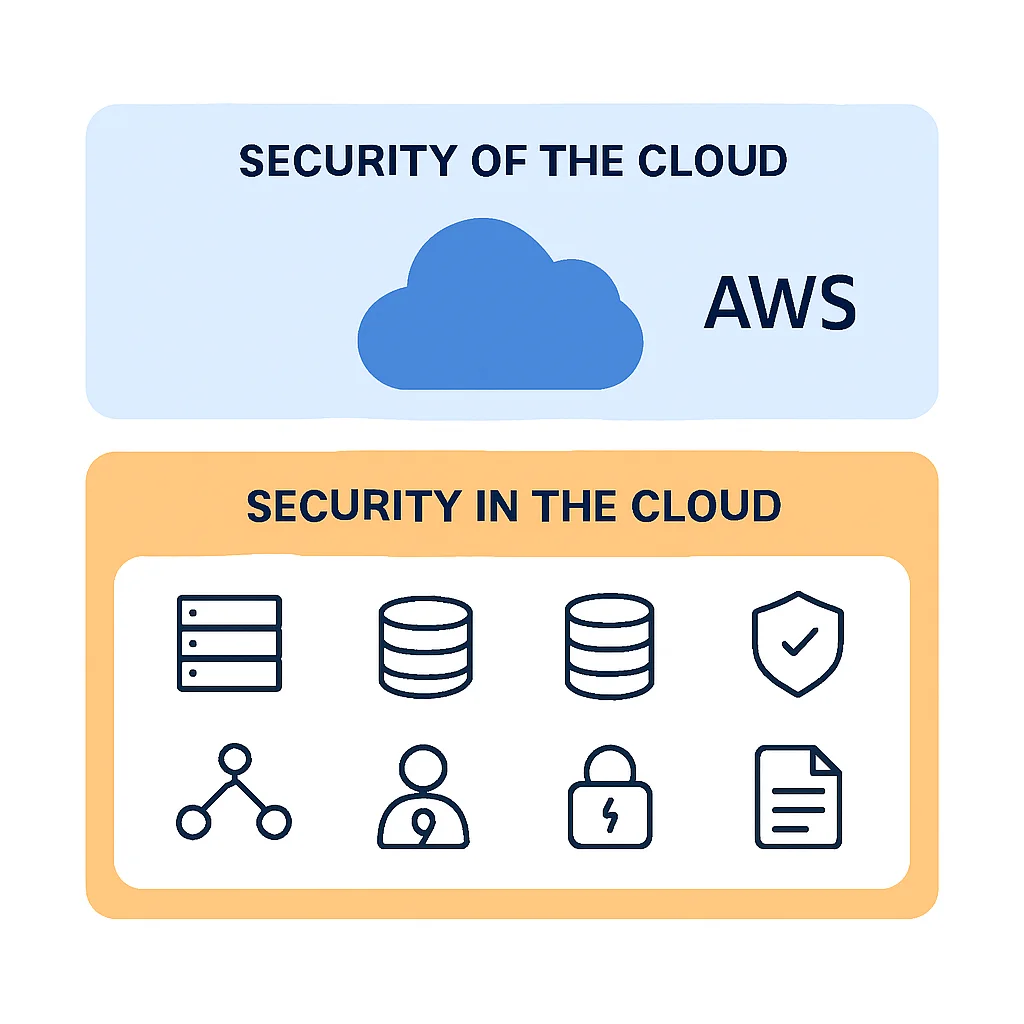
Before diving into specific tactics, it’s crucial to understand the foundational principles that govern cloud security. The Shared Responsibility Model is paramount, defining who is responsible for what. Developers primarily operate within the “security in the cloud” domain, meaning they are responsible for securing their applications, data, configurations, and network settings.
1. Understanding the Shared Responsibility Model
Each major cloud provider (AWS, Azure, GCP) operates under a Shared Responsibility Model, though the specifics vary slightly. In essence, the cloud provider is responsible for the “security of the cloud” (the underlying infrastructure, physical security, global network), while the customer (you, the developer) is responsible for “security in the cloud” (your data, applications, operating systems, network configuration, and identity management). This distinction is critical for developers to understand where their security focus should lie.
2. Identity and Access Management (IAM)
IAM is arguably the most critical pillar of cloud security. Misconfigured IAM roles and excessive permissions are frequent entry points for attackers. Developers must adopt a “least privilege” mindset.
IAM Best Practices
Least Privilege — Grant only the permissions absolutely necessary for a user or service to perform its function. No more, no less.
Multi-Factor Authentication (MFA) — Enforce MFA for all users, especially administrators and privileged accounts. This dramatically reduces the risk of credential compromise.
Temporary Credentials — Avoid hardcoding long-lived access keys. Utilize IAM roles and temporary credentials (e.g., AWS STS, Azure Managed Identities, GCP Service Accounts with short-lived tokens).
Regular Audits — Periodically review IAM policies and access logs to identify and revoke unused or excessive permissions. Tools like AWS IAM Access Analyzer can assist.
For example, an EC2 instance running a web application in AWS should only have permissions to access specific S3 buckets or DynamoDB tables it needs, not full administrative access to the entire account. Similarly, in Azure, an App Service should use a Managed Identity to access Key Vault secrets, rather than storing connection strings directly.
3. Network Security
Securing network boundaries is fundamental. This involves isolating resources, controlling traffic flow, and protecting against common web-based attacks.
KEY POINT
Always configure your network to restrict inbound access to the absolute minimum necessary ports and IP ranges. Never expose administrative ports (like SSH, RDP) to the internet.
Key elements include:
Virtual Private Clouds (VPCs)/Virtual Networks (VNETs): Isolate your cloud resources into private networks. Use subnets to further segment resources based on security zones (e.g., public, private, database).
Security Groups/Network Security Groups (NSGs): Act as virtual firewalls at the instance or network interface level. Define granular inbound and outbound rules, restricting traffic to specific protocols, ports, and source/destination IPs. For example, allow SSH (port 22) only from trusted admin IPs, and HTTP/HTTPS (ports 80/443) from anywhere for web servers.
Web Application Firewalls (WAFs): Protect web applications from common web exploits (e.g., SQL injection, cross-site scripting) by filtering and monitoring HTTP traffic. AWS WAF, Azure Application Gateway WAF, and GCP Cloud Armor are essential for public-facing applications.
Network Access Control Lists (NACLs): Stateless packet filtering at the subnet level, providing an additional layer of defense. While Security Groups are more commonly used for instance-level control, NACLs can offer broader subnet-level blocking.
4. Data Protection and Encryption
Data is the most valuable asset, and its protection is paramount. This involves encryption, data classification, and robust backup strategies.
Data Protection Pillars
Encryption at Rest — Encrypt all data stored in cloud services (databases, object storage, block storage). AWS S3, Azure Blob Storage, GCP Cloud Storage all offer server-side encryption by default or with minimal configuration. Use customer-managed keys (CMK) via KMS, Key Vault, or Cloud KMS for greater control.
Encryption in Transit — Enforce TLS/SSL for all data moving between components, services, and clients. Use HTTPS for web traffic, VPNs for inter-network communication, and ensure internal service-to-service communication is encrypted.
Data Classification — Understand the sensitivity of your data (e.g., PII, financial, intellectual property) and apply appropriate security controls based on its classification. This impacts access controls, encryption levels, and retention policies.
Backup and Recovery — Implement automated, regular backups with strict retention policies. Test recovery procedures periodically to ensure data integrity and business continuity.
For example, in AWS, ensuring all S3 buckets have default encryption enabled (e.g., SSE-S3 or SSE-KMS) is a baseline requirement. For databases like RDS or Azure SQL Database, encryption at rest is usually a checkbox feature during provisioning. Developers should always verify these settings.
ADVANCED STRATEGIES
Advanced Cloud Security Strategies and Implementation
Beyond the foundational principles, developers in 2026 need to embrace more sophisticated strategies to counter evolving threats. This includes integrating security into the development pipeline, securing serverless architectures, and leveraging cloud-native security services.
1. Secure Software Development Lifecycle (SSDLC)
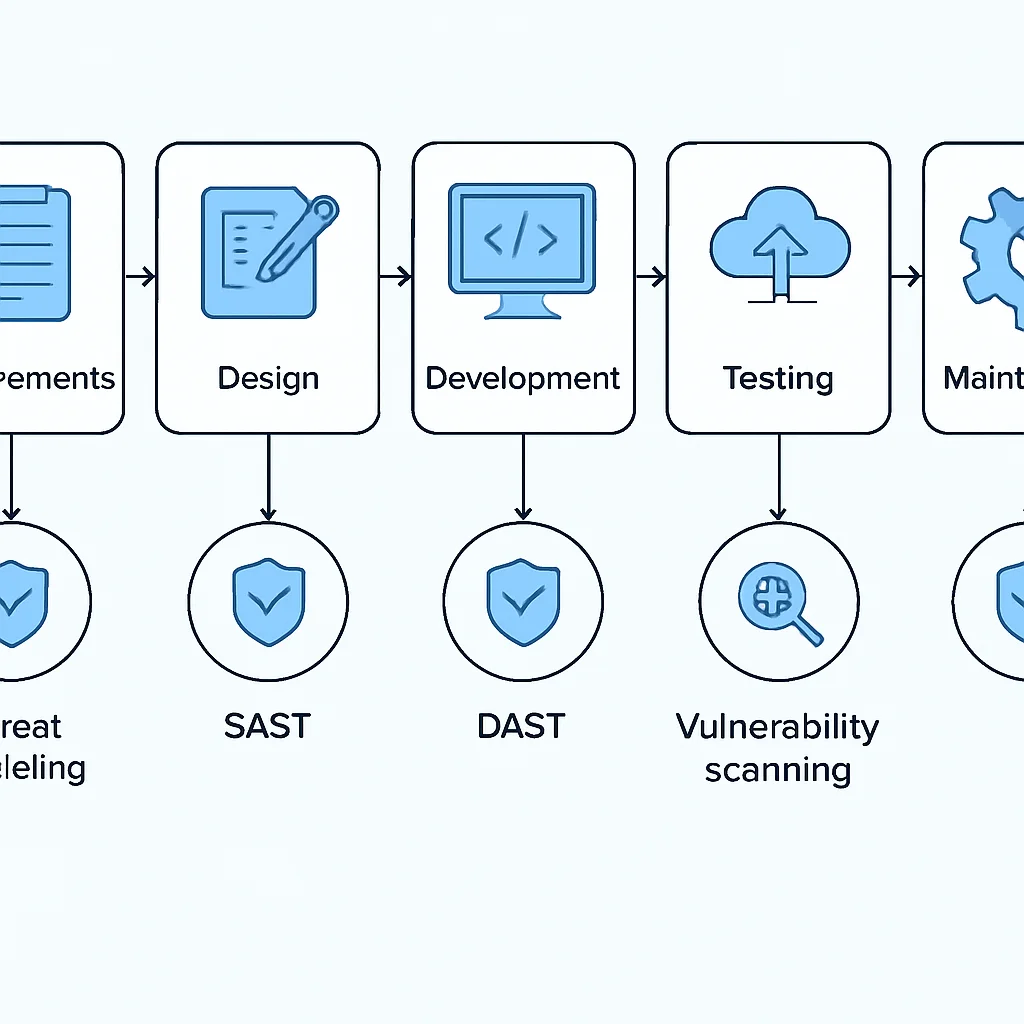
Security should not be an afterthought but rather integrated into every phase of the development lifecycle, from design to deployment and operations (DevSecOps).
Threat Modeling: Before writing code, identify potential threats and vulnerabilities in your application design. Tools like OWASP Threat Dragon can help visualize attack surfaces.
Static Application Security Testing (SAST): Integrate SAST tools into your CI/CD pipeline to analyze source code for common vulnerabilities (e.g., injection flaws, weak cryptography) before deployment. Examples include SonarQube, Checkmarx, or cloud-native options like CodeGuru Security in AWS.
Dynamic Application Security Testing (DAST): Test running applications for vulnerabilities. This can catch issues that SAST misses, such as configuration errors or runtime flaws. Popular tools include OWASP ZAP or Tenable.io.
Dependency Scanning: Automatically scan third-party libraries and dependencies for known vulnerabilities (CVEs). Tools like Snyk, Dependabot (GitHub), or Trivy are essential for managing software supply chain risks.
2. Infrastructure as Code (IaC) Security
IaC (Terraform, CloudFormation, Azure ARM Templates, GCP Deployment Manager) has revolutionized infrastructure provisioning, but it also introduces new security considerations.
KEY POINT
Treat IaC templates like application code: version control, peer review, and automated security scanning are non-negotiable.
Static Analysis for IaC: Use tools to scan your IaC templates for misconfigurations, security vulnerabilities, and compliance violations before deployment. Popular tools include:
- Checkov: Scans Terraform, CloudFormation, Kubernetes, ARM, and Serverless Framework for security and compliance issues.
- Terrascan: Similar to Checkov, supporting multiple IaC types.
- Tfsec: Focused specifically on Terraform security.
Drift Detection: Monitor your deployed cloud infrastructure for deviations from your IaC definitions. Manual changes can introduce security gaps. Cloud providers offer services like AWS CloudFormation Drift Detection or Azure Resource Graph to help.
3. Monitoring, Logging, and Alerting
Visibility into your cloud environment is crucial for detecting and responding to security incidents. Centralized logging and real-time alerting are non-negotiable.
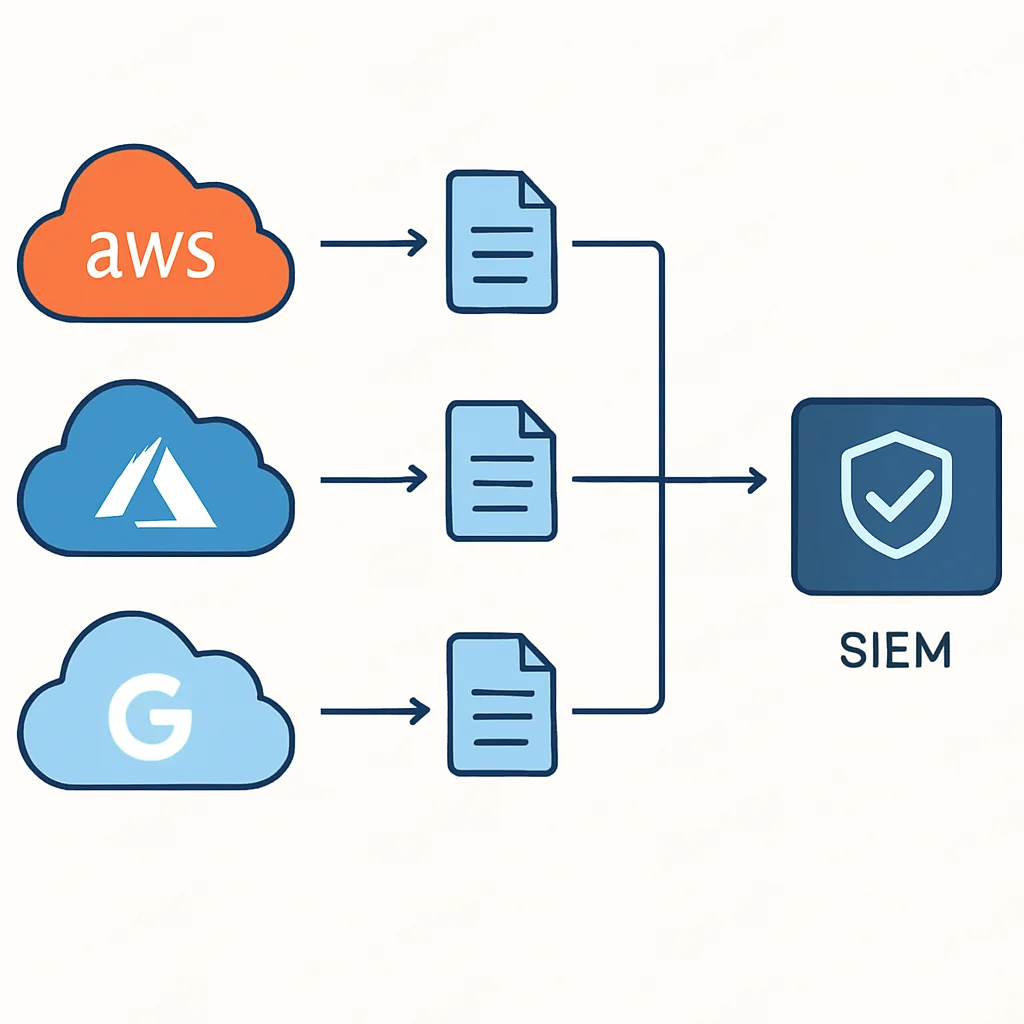
Centralized Logging: Aggregate logs from all cloud resources (compute, network, databases, identity) into a central logging service (AWS CloudWatch Logs, Azure Monitor Logs, GCP Cloud Logging). This facilitates auditing, troubleshooting, and security analysis.
Audit Trails: Enable and monitor audit trails for API calls and configuration changes. AWS CloudTrail, Azure Activity Log, and GCP Cloud Audit Logs record every action, providing an undeniable record of who did what, when, and where.
Security Information and Event Management (SIEM): Integrate cloud logs with a SIEM solution (e.g., Splunk, ELK Stack, Microsoft Sentinel, Chronicle Security Operations) for advanced threat detection, correlation, and incident response.
Real-time Alerting: Configure alerts for suspicious activities, unauthorized access attempts, or critical configuration changes. For example, an alert for root account logins, changes to security groups, or excessive failed login attempts.
PROBLEM SOLVING
Addressing Common Cloud Security Challenges
Even with best practices in mind, developers encounter specific challenges in securing cloud environments. Let’s tackle some of the most prevalent ones.
PROBLEM 01
Managing Complex IAM Across Multiple Cloud Accounts/Projects
As organizations scale, managing IAM roles and permissions across dozens or hundreds of AWS accounts, Azure subscriptions, or GCP projects becomes a nightmare, often leading to overly permissive policies and security gaps.
SOLUTION — Centralize IAM with Identity Providers and Service Control Policies
Integrate your cloud environments with a centralized Identity Provider (IdP) like Okta, Azure AD, or Google Cloud Identity. Use SAML or OIDC for single sign-on (SSO). Implement Service Control Policies (SCPs in AWS Organizations), Azure Blueprints, or GCP Organization Policies to set guardrails at the organizational level, preventing individual accounts/projects from deploying non-compliant resources or overly permissive IAM roles.
For instance, an SCP can prevent any account in an AWS Organization from creating an S3 bucket without encryption enabled. This provides a top-down security enforcement layer.
PROBLEM 02
Securing Serverless Functions and APIs
Serverless (Lambda, Azure Functions, Cloud Functions) abstracts away infrastructure, but developers are still responsible for function security, including permissions, code vulnerabilities, and API gateway configurations.
SOLUTION — Granular Permissions, API Gateway Security, and Code Scanning
Apply the principle of least privilege rigorously to function execution roles. Each function should have an IAM role that grants only the specific permissions it needs (e.g., read from one DynamoDB table, publish to one SQS queue). Use API Gateways (AWS API Gateway, Azure API Management, GCP API Gateway) to manage authentication, authorization, throttling, and WAF protection for your serverless APIs. Integrate SAST/DAST tools into your CI/CD pipeline to scan function code for vulnerabilities, and regularly review dependencies for known CVEs.
For example, an AWS Lambda function triggered by an S3 event to process images should only have permissions to read from the source S3 bucket, write to a destination S3 bucket, and potentially log to CloudWatch. It does not need access to EC2, RDS, or other unrelated services.
KEY POINT
Automating security checks in CI/CD pipelines is crucial for catching misconfigurations and vulnerabilities early, reducing remediation costs and risks.
PRACTICAL APPLICATION
Practical Implementation: Code Examples and Tools
Let’s put theory into practice with some concrete examples that developers can implement today.
1. Implementing Least Privilege with AWS IAM Policy (Terraform)
This Terraform example demonstrates an IAM policy that grants an EC2 instance read-only access to a specific S3 bucket and the ability to log to CloudWatch. This adheres strictly to the least privilege principle.
CODE EXPLANATION
This Terraform code defines an AWS IAM policy. It grants permissions for an EC2 instance to perform s3:GetObject on a specific S3 bucket (for reading files) and allows it to create and put log events into CloudWatch. This ensures the instance only has access to what it strictly needs, following the least privilege principle.
resource "aws_iam_policy" "ec2_app_policy" {
  name        = "ec2-app-read-s3-logs-policy"
  description = "IAM policy for EC2 instance to read from specific S3 bucket and log to CloudWatch"

  policy = jsonencode({
    Version = "2012-10-17",
    Statement = [
      {
        Action = [
          "s3:GetObject",
        ],
        Effect = "Allow",
        Resource = [
          "arn:aws:s3:::my-secure-app-data-2026/*",
        ],
      },
      {
        Action = [
          "logs:CreateLogGroup",
          "logs:CreateLogStream",
          "logs:PutLogEvents",
        ],
        Effect = "Allow",
        Resource = [
          "arn:aws:logs:*:*:*",
        ],
      },
    ],
  })
}

resource "aws_iam_role" "ec2_app_role" {
  name               = "ec2-app-role"
  assume_role_policy = jsonencode({
    Version = "2012-10-17",
    Statement = [
      {
        Action = "sts:AssumeRole",
        Effect = "Allow",
        Principal = {
          Service = "ec2.amazonaws.com"
        }
      }
    ]
  })
}

resource "aws_iam_role_policy_attachment" "ec2_app_attach" {
  role       = aws_iam_role.ec2_app_role.name
  policy_arn = aws_iam_policy.ec2_app_policy.arn
}
2. Enforcing HTTPS with Azure Application Gateway (ARM Template)
This snippet from an Azure Resource Manager (ARM) template configures an Application Gateway to enforce HTTPS, redirecting all HTTP traffic to HTTPS, a crucial step for data in transit encryption.
CODE EXPLANATION
This ARM template snippet defines an Azure Application Gateway listener and routing rule. It configures an HTTP listener on port 80 and a HTTPS listener on port 443. The redirectConfiguration ensures that all incoming HTTP traffic is automatically redirected to its HTTPS equivalent, enforcing secure communication.
{
  "apiVersion": "2018-12-01",
  "type": "Microsoft.Network/applicationGateways",
  "name": "[parameters('applicationGatewayName')]",
  "location": "[resourceGroup().location]",
  "properties": {
    "sku": {
      "name": "Standard_v2",
      "tier": "Standard_v2"
    },
    "gatewayIPConfigurations": [
      {
        "name": "appGwIpConfig",
        "properties": {
          "subnet": {
            "id": "[resourceId('Microsoft.Network/virtualNetworks/subnets', parameters('vnetName'), parameters('appGatewaySubnetName'))]"
          }
        }
      }
    ],
    "frontendIPConfigurations": [
      {
        "name": "appGwPublicFrontendIp",
        "properties": {
          "publicIPAddress": {
            "id": "[resourceId('Microsoft.Network/publicIPAddresses', parameters('publicIpAddressName'))]"
          }
        }
      }
    ],
    "frontendPorts": [
      {
        "name": "appGwFrontendPort80",
        "properties": {
          "port": 80
        }
      },
      {
        "name": "appGwFrontendPort443",
        "properties": {
          "port": 443
        }
      }
    ],
    "httpListeners": [
      {
        "name": "httpListener",
        "properties": {
          "frontendIPConfiguration": {
            "id": "[concat(resourceId('Microsoft.Network/applicationGateways', parameters('applicationGatewayName')), '/frontendIPConfigurations/appGwPublicFrontendIp')]"
          },
          "frontendPort": {
            "id": "[concat(resourceId('Microsoft.Network/applicationGateways', parameters('applicationGatewayName')), '/frontendPorts/appGwFrontendPort80')]"
          },
          "protocol": "Http",
          "requireServerNameIndication": false
        }
      },
      {
        "name": "httpsListener",
        "properties": {
          "frontendIPConfiguration": {
            "id": "[concat(resourceId('Microsoft.Network/applicationGateways', parameters('applicationGatewayName')), '/frontendIPConfigurations/appGwPublicFrontendIp')]"
          },
          "frontendPort": {
            "id": "[concat(resourceId('Microsoft.Network/applicationGateways', parameters('applicationGatewayName')), '/frontendPorts/appGwFrontendPort443')]"
          },
          "protocol": "Https",
          "sslCertificate": {
            "id": "[concat(resourceId('Microsoft.Network/applicationGateways', parameters('applicationGatewayName')), '/sslCertificates/', parameters('sslCertificateName'))]"
          },
          "requireServerNameIndication": true
        }
      }
    ],
    "requestRoutingRules": [
      {
        "name": "httpToHttpsRedirect",
        "properties": {
          "ruleType": "Basic",
          "httpListener": {
            "id": "[concat(resourceId('Microsoft.Network/applicationGateways', parameters('applicationGatewayName')), '/httpListeners/httpListener')]"
          },
          "redirectConfiguration": {
            "id": "[concat(resourceId('Microsoft.Network/applicationGateways', parameters('applicationGatewayName')), '/redirectConfigurations/httpToHttps')]"
          }
        }
      }
    ],
    "redirectConfigurations": [
      {
        "name": "httpToHttps",
        "properties": {
          "redirectType": "Permanent",
          "targetListener": {
            "id": "[concat(resourceId('Microsoft.Network/applicationGateways', parameters('applicationGatewayName')), '/httpListeners/httpsListener')]"
          },
          "includePath": true,
          "includeQueryString": true
        }
      }
    ]
  }
}
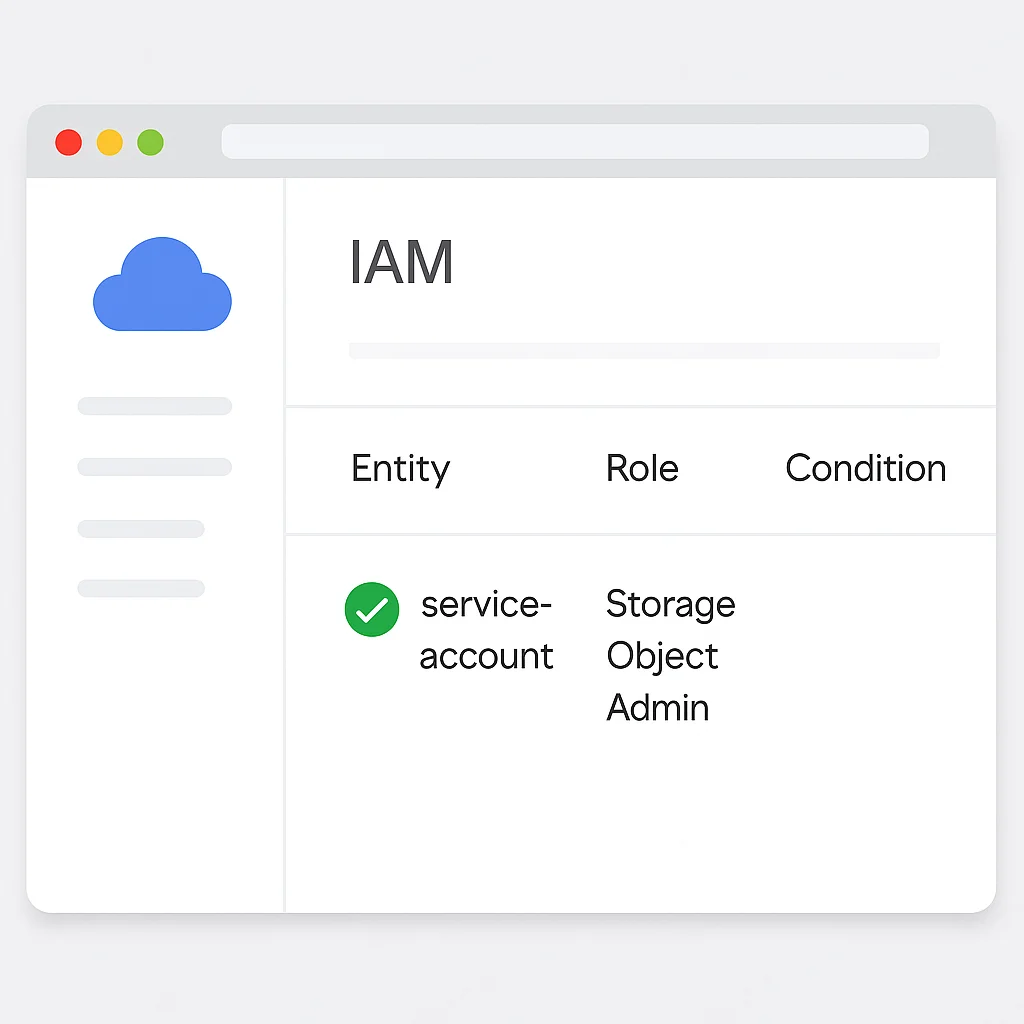
3. Securing GCP Cloud Storage with Bucket Policy (YAML)
This GCP Cloud Storage bucket IAM policy, defined in YAML, demonstrates how to restrict access to a bucket, allowing only a specific service account to read and write objects, and preventing public access.
CODE EXPLANATION
This YAML snippet defines an IAM policy for a Google Cloud Storage bucket. It grants the roles/storage.objectAdmin role (full object access) to a specific service account, ensuring only authorized applications can interact with the data. Crucially, it does NOT include allUsers or allAuthenticatedUsers, preventing accidental public exposure.
bindings:
- role: roles/storage.objectAdmin
  members:
  - serviceAccount: my-secure-app-service-account@my-gcp-project-2026.iam.gserviceaccount.com
etag: BwWk1f+v/
To apply this, you’d typically use gcloud iam buckets set-iam-policy gs://my-secure-data-bucket-2026 my-policy.yaml.
KEY POINT
Leverage cloud-native security services (e.g., AWS Security Hub, Azure Security Center/Defender for Cloud, GCP Security Command Center) for integrated vulnerability management, compliance monitoring, and threat detection.
Frequently Asked Questions
Q. What is the most common cloud security vulnerability developers face in 2026?
The most common vulnerability remains cloud misconfigurations, especially related to IAM policies and network security groups. These errors often lead to overly permissive access or publicly exposed resources, which attackers actively scan for.
Q. How does the Shared Responsibility Model affect a developer’s role in cloud security?
It clarifies that while cloud providers secure the underlying infrastructure (“security OF the cloud”), developers are responsible for securing everything they deploy and configure (“security IN the cloud”). This means developers must actively manage IAM, network settings, data encryption, and application code security.
Q. What are the key benefits of integrating security tools into the CI/CD pipeline?
Integrating security tools (like SAST, DAST, IaC scanners, and dependency checkers) into CI/CD pipelines enables early detection of vulnerabilities. This “shift-left” approach significantly reduces the cost and effort of remediation, improves overall security posture, and speeds up secure deployments.
Q. How can developers stay updated on new cloud security threats and best practices?
Developers should regularly follow official cloud provider security blogs, subscribe to security newsletters (e.g., OWASP, SANS), participate in security communities, and attend relevant webinars or conferences. Continuous learning and awareness are vital in the rapidly evolving cloud threat landscape.
WRAP-UP
Conclusion and Future Outlook
The journey to building truly secure cloud applications is ongoing, but armed with the right knowledge and practices, developers can significantly strengthen their defenses. We’ve explored the critical importance of understanding the Shared Responsibility Model, implementing stringent IAM policies, securing network boundaries, protecting data with encryption, and integrating security throughout the development lifecycle with IaC scanning and robust monitoring.
As we look ahead to the rest of 2026 and beyond, the cloud security landscape will continue to evolve. Emerging technologies like AI and machine learning are increasingly being leveraged not only by attackers but also by defenders. Expect to see more sophisticated threat detection mechanisms, automated remediation, and intelligent security posture management tools becoming mainstream. Developers will need to adapt to these advancements, continuously learning and integrating new security paradigms into their workflows.
“Proactive security is the new agile. Embrace it early, automate it often, and make it an integral part of your development DNA.”
— Kwonglish Cloud Security Insights
By diligently applying the best practices discussed today, you’re not just safeguarding your applications; you’re building trust, ensuring compliance, and contributing to a more secure digital ecosystem. Remember, security is a shared journey, and every developer plays a vital role in its success.
Thanks for reading!
We hope this guide provides a solid foundation for your cloud security endeavors. Your commitment to security is what makes the cloud a safer place for everyone.
Got questions or your own favorite cloud security tips? Drop a comment below and let’s keep the conversation going!