
SUMMARY
Mastering CI/CD with GitHub Actions in 2026: A Developer’s Guide
A comprehensive guide to building robust CI/CD pipelines with GitHub Actions, focusing on best practices and advanced features for modern software delivery.
Keywords: GitHub Actions, CI/CD, DevOps
TABLE OF CONTENTS
1. The Imperative of CI/CD in 2026: Why GitHub Actions?
2. Dissecting GitHub Actions: Core Concepts and Architecture
3. Architecting Your First CI/CD Pipeline: A Practical Node.js Example
4. Elevating Your Workflows: Advanced GitHub Actions Features and Best Practices
5. Navigating Common Pitfalls: Solutions to GitHub Actions Challenges
6. Real-World Integration: Diverse Use Cases for GitHub Actions
7. Frequently Asked Questions
8. Conclusion: The Future of Automated Software Delivery
BACKGROUND
1. The Imperative of CI/CD in 2026: Why GitHub Actions?
In the rapidly evolving landscape of software development in 2026, the demand for speed, reliability, and quality has never been higher. Development teams are under constant pressure to deliver features faster, fix bugs quicker, and ensure a seamless user experience. This is precisely where the principles of Continuous Integration (CI) and Continuous Delivery/Deployment (CD) become not just beneficial, but absolutely essential.
Continuous Integration (CI) is a development practice where developers frequently merge their code changes into a central repository. Automated builds and tests are then run. The primary goal of CI is to detect and address integration errors early, making the development process more agile and less prone to costly delays. By 2026, teams merging code multiple times a day is commonplace, significantly reducing integration headaches.
Continuous Delivery (CD) extends CI by automatically preparing code changes for a release to production. This means that after the build and test phases, the application is packaged, configured, and deployed to a staging environment, ready for manual release. Continuous Deployment takes this a step further by automatically deploying every validated change to production, without human intervention. The benefits are profound: faster time-to-market, reduced risk of errors, and improved developer productivity.
Among the plethora of CI/CD tools available today, GitHub Actions has emerged as a dominant player, particularly for projects hosted on GitHub. Its seamless integration with the GitHub ecosystem, coupled with its powerful automation capabilities, makes it an attractive choice for developers and DevOps engineers alike. Data from late 2025 indicated that GitHub Actions saw a remarkable 35% year-over-year increase in active repositories utilizing its workflows, solidifying its position as a go-to solution for automated software pipelines.
GitHub Actions allows you to automate, customize, and execute your software development workflows right in your repository. You can discover, create, and share actions to perform any job, including CI/CD, and combine them into a fully custom workflow. This guide will delve into how you can harness its full potential to streamline your development process in 2026.
KEY POINT
CI/CD is paramount in 2026 for rapid, reliable software delivery. GitHub Actions stands out due to its deep integration with GitHub, YAML-based simplicity, and a vibrant marketplace, enabling robust automation directly within your repository.
CORE CONCEPTS
2. Dissecting GitHub Actions: Core Concepts and Architecture
To effectively leverage GitHub Actions, it’s crucial to understand its fundamental building blocks. These components work together to define and execute your automation workflows.
Workflows: The Orchestration Layer
A workflow is an automated, configurable process that you set up in your repository to build, test, package, release, or deploy any project on GitHub. Workflows are defined in YAML files (.yml or .yaml) and stored in the .github/workflows directory of your repository. Each repository can have multiple workflows, each triggered by different events.
Events: The Triggers
Events are specific activities that trigger a workflow. Common events include a push to a branch, a pull_request being opened, a scheduled time (schedule), or even a manual trigger via the GitHub UI (workflow_dispatch). Understanding which events to use is key to creating efficient and relevant workflows.
Jobs: The Execution Units
A workflow run is made up of one or more jobs. Jobs run in parallel by default, but you can configure them to run sequentially. Each job executes on a fresh virtual environment called a “runner.” Runners can be GitHub-hosted (e.g., Ubuntu Linux, Windows, macOS) or self-hosted, providing flexibility for different project requirements.
Steps: The Individual Tasks
A step is an individual task within a job. Steps can be either shell commands (e.g., run: npm install) or “actions” (reusable units of code). Steps are executed in the order they are defined and can share data using the runner’s filesystem.
Actions: The Reusable Building Blocks
Actions are the smallest portable building block of a workflow. They can be custom-built by you, pulled from the GitHub Marketplace, or even composed from existing actions. For example, actions/checkout@v4 is a popular action used to check out your repository’s code onto the runner.
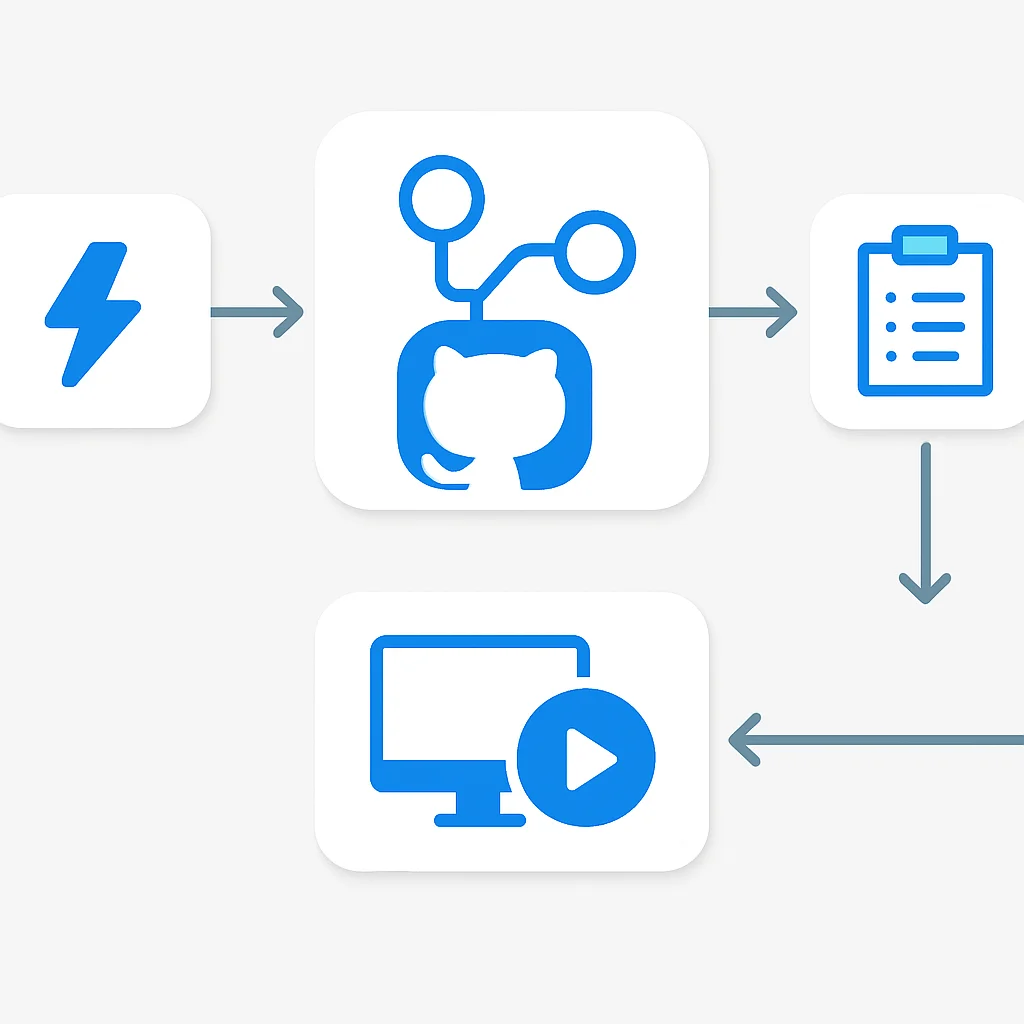
Here’s a simple example of a GitHub Actions workflow that prints “Hello, Kwonglish!” when code is pushed to the main branch:
CODE EXPLANATION
This YAML defines a workflow named “Simple Greeting” that runs whenever a push occurs on the main branch. It has one job, “greet”, which executes on an Ubuntu runner. The job contains a single step that prints a message to the console.
name: Simple Greeting

on:
  push:
    branches:
      - main

jobs:
  greet:
    runs-on: ubuntu-latest
    steps:
      - name: Say hello
        run: echo "Hello, Kwonglish!"
GitHub Actions vs. Other CI/CD Tools
While tools like Jenkins, GitLab CI, CircleCI, and Travis CI have long been mainstays in the CI/CD world, GitHub Actions offers distinct advantages, especially for GitHub users:
- Native Integration: Being part of the GitHub ecosystem, it provides unparalleled integration with repositories, pull requests, issues, and project boards. This reduces context switching and simplifies setup significantly compared to external tools.
- YAML-driven Simplicity: Workflows are defined in intuitive YAML files, making them easy to read, write, and version control alongside your code. This contrasts with more complex UI-driven configurations or proprietary scripting languages found in some older systems.
- Extensive Marketplace: The GitHub Marketplace boasts thousands of pre-built actions, covering almost any task imaginable from cloud deployments to code quality checks. This significantly reduces the need to write custom scripts for common operations. By early 2026, the marketplace featured over 15,000 unique actions, a testament to its community support.
- Cost-Effectiveness: For public repositories, GitHub Actions is free. For private repositories, it offers generous free tiers, making it highly accessible for small to medium-sized teams.
While Jenkins offers extensive customization and self-hosting capabilities, it often requires significant operational overhead. GitLab CI is a strong contender for those already deeply integrated into the GitLab ecosystem, but GitHub Actions provides a more streamlined experience for projects primarily hosted on GitHub.
KEY POINT
GitHub Actions workflows are defined in YAML files, triggered by events, and composed of jobs (running on runners) that execute ordered steps, which can be shell commands or reusable actions. Its native integration and vast marketplace set it apart from many competitors.
PRACTICAL APPLICATION
3. Architecting Your First CI/CD Pipeline: A Practical Node.js Example
Let’s put theory into practice by building a common CI/CD pipeline for a Node.js application. Our goal is to set up a workflow that automatically builds, tests, and deploys our application whenever changes are pushed to the main branch. We’ll assume a typical Node.js project structure with a package.json file, test scripts, and a build command.
Workflow Overview:
- Trigger: On push to
mainbranch. - Checkout Code: Get the latest code from the repository.
- Setup Node.js: Configure the correct Node.js version.
- Install Dependencies: Run
npm install. - Run Tests: Execute
npm test. - Build Application: Run
npm run build. - Deploy: Deploy the built application to a target environment (e.g., a cloud provider).
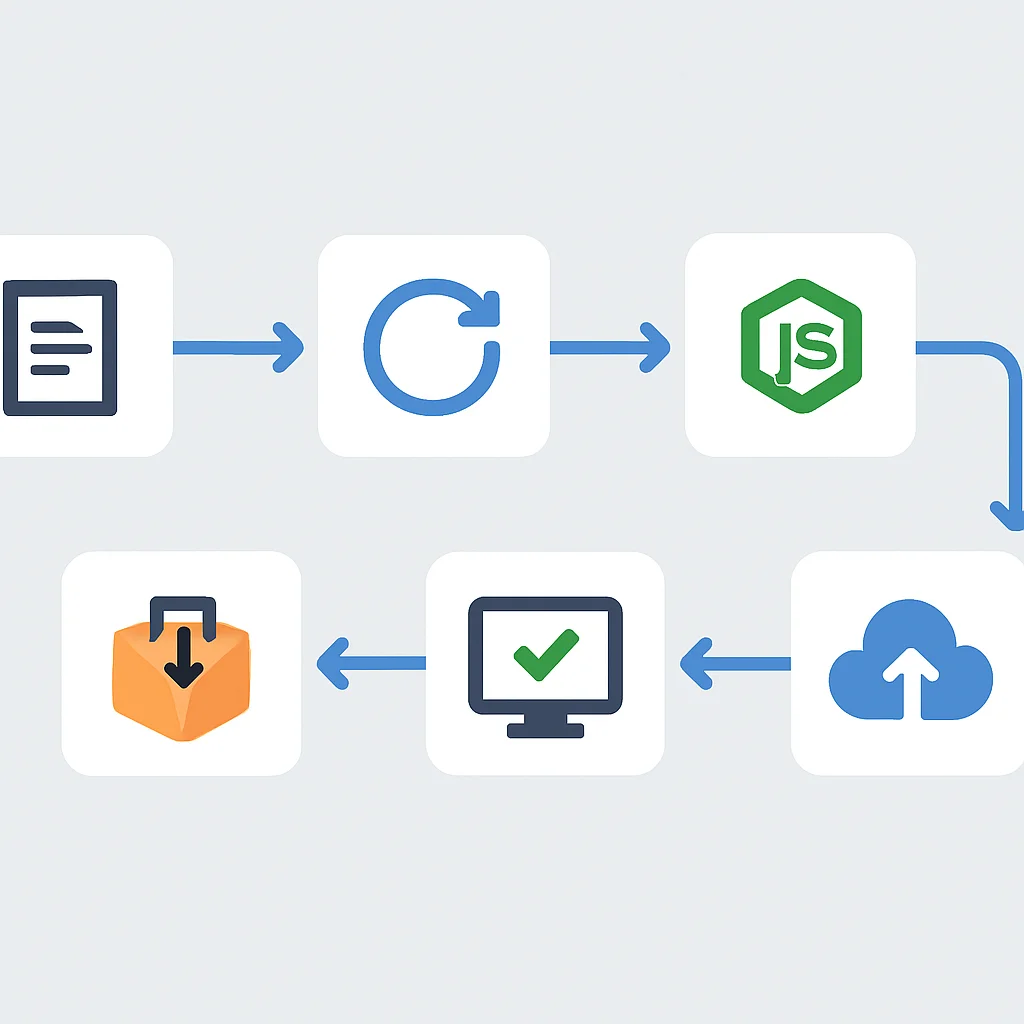
Create a new file named .github/workflows/node-ci-cd.yml in your repository and add the following content:
CODE EXPLANATION
This workflow defines a CI/CD pipeline for a Node.js application. It triggers on pushes to the main branch. The build-and-deploy job sets up Node.js, installs dependencies, runs tests, builds the project, and then uses a placeholder action to simulate deployment. Note the use of secrets.DEPLOY_TOKEN for secure authentication during deployment.
name: Node.js CI/CD Pipeline

on:
  push:
    branches:
      - main

jobs:
  build-and-deploy:
    runs-on: ubuntu-latest

    steps:
      - name: Checkout repository
        uses: actions/checkout@v4 # Checks out your repository under $GITHUB_WORKSPACE

      - name: Setup Node.js environment
        uses: actions/setup-node@v4
        with:
          node-version: '20' # Specify the Node.js version

      - name: Install dependencies
        run: npm ci # 'npm ci' for clean install in CI environments

      - name: Run tests
        run: npm test

      - name: Build application
        run: npm run build

      - name: Deploy to Production
        # Replace this with your actual deployment action.
        # Examples: actions/upload-artifact, octokit/request-action, specific cloud provider actions.
        # For demonstration, we'll use a generic placeholder.
        run: |
          echo "Deploying application to production environment..."
          # Example: Call a deployment script or use a marketplace action
          # For a real scenario, you might use:
          # - aws-actions/configure-aws-credentials@v4 & aws-actions/amazon-ecs-deploy@v1
          # - azure/webapps-deploy@v2
          # - GoogleCloudPlatform/github-actions/deploy-cloudrun@v1
          echo "Deployment successful using DEPLOY_TOKEN: ***"
        env:
          DEPLOY_TOKEN: ${{ secrets.DEPLOY_TOKEN }} # Accessing a secret for authentication
Managing Secrets Securely
In the deployment step above, you’ll notice env: DEPLOY_TOKEN: ${{ secrets.DEPLOY_TOKEN }}. This is how GitHub Actions securely handles sensitive information like API keys, database credentials, or deployment tokens. Secrets are environment variables encrypted by GitHub and are only exposed to selected jobs. They are not printed in logs and are not accessible to public forks.
To add a secret:
- Navigate to your repository on GitHub.
- Click on Settings.
- In the left sidebar, click Secrets and variables > Actions.
- Click New repository secret.
- Enter
DEPLOY_TOKENas the Name and your actual token as the Value. - Click Add secret.
Environment Setup and Best Practices
Using actions/setup-node@v4 allows you to specify the exact Node.js version, ensuring consistency across your development and CI/CD environments. For installing dependencies, npm ci is preferred over npm install in CI environments because it performs a clean install, honoring the package-lock.json (or yarn.lock) file to ensure reproducible builds, which is critical for reliability.
This basic pipeline provides a solid foundation. Once configured, every push to your main branch will automatically trigger this workflow, providing immediate feedback on code quality and readiness for deployment. This drastically reduces manual effort and increases confidence in your releases.
KEY POINT
A practical CI/CD pipeline involves checkout, environment setup (e.g., Node.js), dependency installation (preferring npm ci), testing, building, and deployment. GitHub Secrets are vital for securely managing sensitive credentials without exposing them in your workflow files.
ADVANCED FEATURES
4. Elevating Your Workflows: Advanced GitHub Actions Features and Best Practices
Once you’ve mastered the basics, GitHub Actions offers a suite of advanced features and best practices to make your CI/CD pipelines even more robust, efficient, and secure. Implementing these can significantly improve your development velocity and code quality.
Key Advanced Features
Matrix Builds — Run jobs across multiple combinations of variables (e.g., OS, Node.js versions) for comprehensive testing.
Caching Dependencies — Store and reuse frequently accessed files (like node_modules) to speed up subsequent workflow runs.
Reusable Workflows — Promote the DRY (Don’t Repeat Yourself) principle by calling common workflows from multiple repositories or within the same repository.
Self-Hosted Runners — Execute jobs on your own infrastructure for custom hardware, specific environments, or private network access.
Matrix Builds for Comprehensive Testing
Matrix strategies allow you to run a single job with different combinations of variables. This is incredibly useful for testing your application against multiple operating systems, programming language versions, or dependency versions without duplicating job definitions. For instance, testing a Node.js application on Node.js 18, 20, and 22 across Ubuntu and Windows can be done with a single matrix job.
Caching Dependencies for Faster Builds
One of the most effective ways to reduce workflow execution time is by caching dependencies. For Node.js projects, this typically means caching the node_modules directory. The actions/cache action handles the logic for saving and restoring caches based on a generated key.
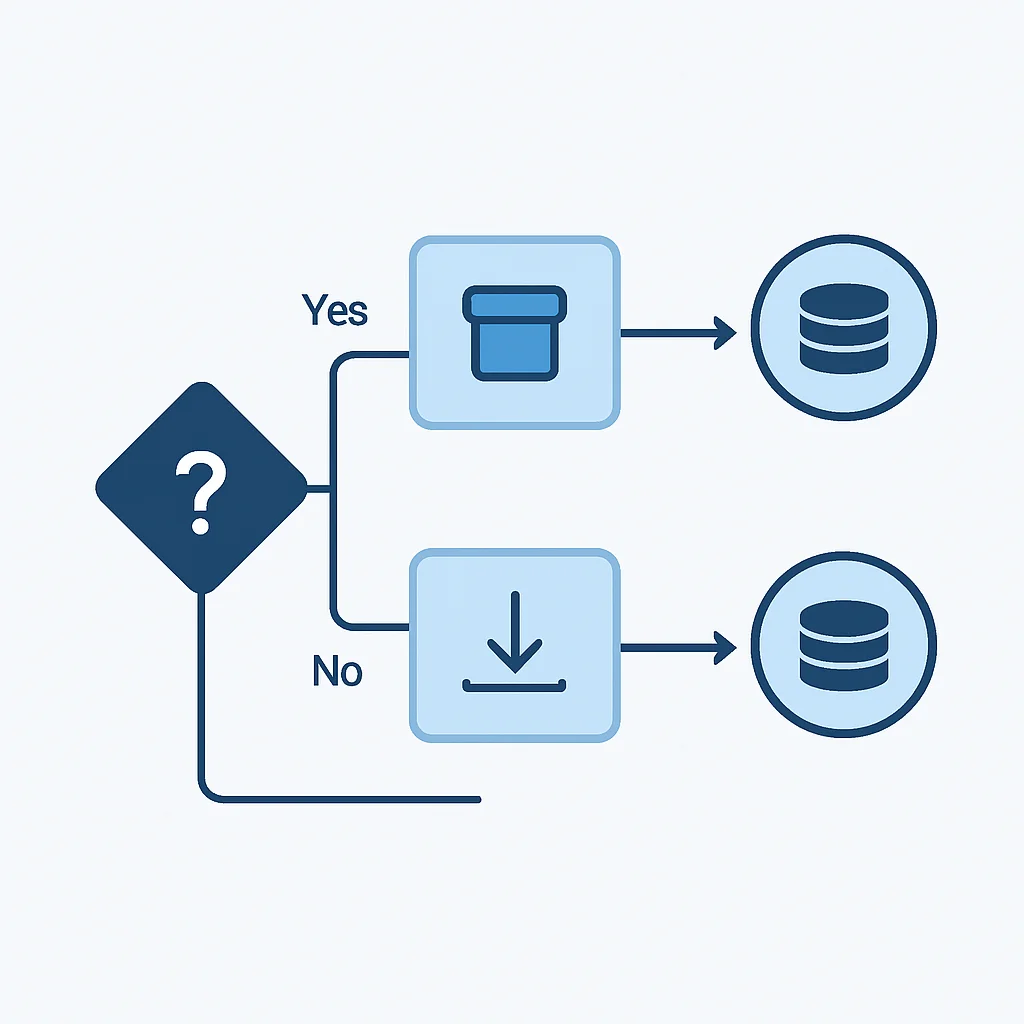
Consider this addition to your Node.js workflow:
CODE EXPLANATION
This step utilizes the actions/cache action to store and retrieve the node_modules directory. The cache key is generated using the runner’s OS and a hash of package-lock.json, ensuring the cache is invalidated when dependencies change. This can reduce dependency installation time by up to 70% in subsequent runs.
      - name: Cache Node.js modules
        uses: actions/cache@v4
        with:
          path: ~/.npm # Or node_modules for local caching
          key: ${{ runner.os }}-node-${{ hashFiles('**/package-lock.json') }}
          restore-keys: |
            ${{ runner.os }}-node-

      - name: Install dependencies
        run: npm ci
Reusable Workflows for DRY Principles
As your projects grow, you might find yourself duplicating common CI/CD patterns (e.g., standardized build and test steps) across multiple repositories or even within the same repository. Reusable workflows, introduced in late 2024, allow you to define a workflow once and call it from other workflows. This promotes the “Don’t Repeat Yourself” (DRY) principle, making your CI/CD setup more maintainable and consistent. For instance, a central “build-and-test.yml” workflow can be called by all your microservices.
Self-Hosted Runners for Specific Needs
While GitHub’s hosted runners are convenient, there are scenarios where self-hosted runners are preferable. These include:
- Access to Private Networks: When your build process needs to interact with resources behind your corporate firewall.
- Custom Hardware: For tasks requiring specific hardware (e.g., GPUs for machine learning, specific mobile devices).
- Increased Resources: If GitHub’s hosted runner limits (e.g., RAM, CPU) are insufficient for your demanding builds.
- Cost Optimization: For very high usage, self-hosting can sometimes be more cost-effective.
Setting up a self-hosted runner involves installing an agent on your machine (Linux, Windows, macOS) and registering it with your GitHub repository or organization. Jobs can then specify runs-on: self-hosted.
Security Considerations
Security is paramount in any CI/CD pipeline. Here are some best practices for GitHub Actions:
- Least Privilege: Grant your workflows and actions only the minimum necessary permissions. Use the
permissionskey in your workflow. - OpenID Connect (OIDC): Use OIDC with cloud providers (AWS, Azure, GCP) to authenticate your workflows without long-lived secrets, rotating short-lived tokens instead. This is a significant security enhancement for 2026.
- Dependency Review: Use the
dependency-review-actionto automatically check for vulnerable dependencies in pull requests. - Code Scanning: Integrate tools like CodeQL or third-party static analysis tools into your CI pipeline to detect security vulnerabilities in your code.
- Pin Actions to Specific SHAs: Instead of
@v4, use@<commit-SHA>for critical actions to prevent unexpected changes if the action developer updates the tag.
KEY POINT
Advanced GitHub Actions features like matrix builds, dependency caching, and reusable workflows significantly enhance efficiency and maintainability. Prioritizing security through least privilege, OIDC, and dependency scanning is crucial for robust CI/CD pipelines in 2026.
PROBLEM SOLVING
5. Navigating Common Pitfalls: Solutions to GitHub Actions Challenges
Even with its robust features, developers often encounter common challenges when implementing and maintaining GitHub Actions workflows. Understanding these pitfalls and their solutions is key to building resilient CI/CD pipelines.
Flaky Tests and Inconsistent Results
Flaky tests—tests that sometimes pass and sometimes fail without any code changes—are a major source of frustration and distrust in CI/CD pipelines. They can stem from race conditions, reliance on external services, or improper test setup/teardown.
Solution: Focus on making tests deterministic. Isolate tests from external factors by using mocks and stubs. Ensure proper cleanup after each test. For tests interacting with external APIs, consider using a testing framework’s retry mechanism or integrating a dedicated test retry action if your framework doesn’t support it natively. For example, Jest has a --detectOpenHandles flag that can help identify asynchronous operations not properly closed.
Dependency Management Issues
Outdated or vulnerable dependencies can introduce security risks and break builds. Manually tracking these can be cumbersome.
Solution: Integrate automated dependency scanning and updating. GitHub’s Dependabot can automatically open pull requests to update dependencies and notify you of vulnerabilities. Additionally, the dependency-review-action can be added to your workflow to prevent pull requests from merging if they introduce known vulnerable dependencies. This proactive approach ensures your project stays secure and up-to-date.
Deployment Failures and Rollbacks
Deployments can fail for various reasons: environment misconfigurations, network issues, or even subtle bugs that slipped through testing. When a deployment fails, a quick and reliable rollback mechanism is crucial.
Solution: Design your deployment strategy with rollbacks in mind. Many cloud providers offer native rollback capabilities (e.g., AWS CodeDeploy, Azure Deployment Slots). Within GitHub Actions, you can create a dedicated workflow for manual or automated rollbacks that deploys a previously successful build. Ensure your deployment action provides clear error messages to aid in debugging. Consider using deployment environments in GitHub to manage access and approvals for production deployments, further reducing risk.
WARNING
Never hardcode sensitive credentials directly into your workflow files. Always use GitHub Secrets for API keys, tokens, and other confidential information to prevent security breaches.
KEY POINT
Common GitHub Actions challenges like slow builds, flaky tests, and deployment failures can be mitigated by implementing caching, writing deterministic tests, utilizing automated dependency scanning, and designing robust rollback strategies. Always prioritize security by using GitHub Secrets.
USE CASES
6. Real-World Integration: Diverse Use Cases for GitHub Actions
GitHub Actions is incredibly versatile, extending far beyond simple build-and-test scenarios. Its rich marketplace and flexible YAML syntax enable automation for a wide array of real-world use cases, integrating seamlessly with various platforms and development methodologies.
Case 1: Serverless Application Deployment to AWS Lambda
Automatically build, test, and deploy a Python or Node.js serverless application to AWS Lambda via Serverless Framework or AWS SAM, triggered by pushes to the main branch. This includes configuring AWS credentials using OIDC for enhanced security.
Case 2: Mobile App CI/CD for Android and iOS
Automate the build, testing, and distribution of mobile applications. For Android, build APKs/AABs, run unit/instrumentation tests, and upload to Firebase App Distribution or Google Play. For iOS, build IPAs, run XCUITest, and distribute via TestFlight or App Store Connect. This typically involves using macOS runners and specialized actions like fastlane/actions.
Case 3: Monorepo Management with Nx or Turborepo
For monorepos, use tools like Nx or Turborepo in conjunction with GitHub Actions to intelligently run CI/CD only for affected projects based on code changes. This significantly reduces CI/CD times by skipping unnecessary builds and tests, leveraging paths filters and advanced caching strategies.
Cloud Deployment Integration
A significant portion of CI/CD pipelines in 2026 involves deploying to cloud environments. GitHub Actions provides first-party and community-maintained actions for all major cloud providers:
- AWS: Actions like
aws-actions/configure-aws-credentials,aws-actions/amazon-ecs-deploy, andaws-actions/s3-syncfacilitate deployment to S3, EC2, ECS, Lambda, and more. - Azure: Actions such as
azure/webapps-deploy,azure/container-apps-deploy-action, andazure/loginstreamline deployments to Azure App Services, Container Apps, and other Azure resources. - Google Cloud Platform (GCP): Use
GoogleCloudPlatform/github-actions/authfor authentication and specific actions for deploying to Cloud Run, GKE, App Engine, etc.
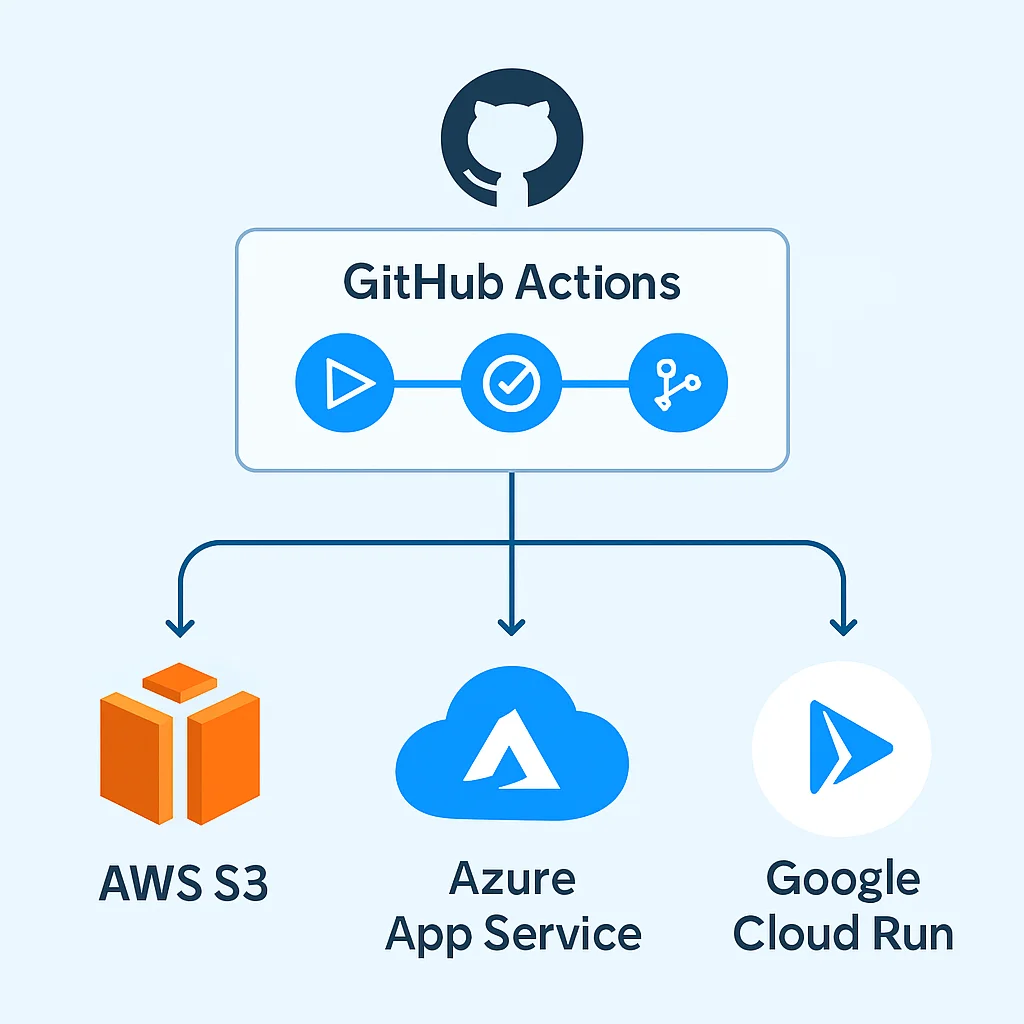
The use of OpenID Connect (OIDC) for authentication with these cloud providers has become a standard best practice in 2026, eliminating the need to store long-lived cloud access keys as GitHub Secrets and significantly enhancing security posture.
Beyond CI/CD: Workflow Automation
GitHub Actions isn’t limited to just CI/CD. It excels at general workflow automation within your repository:
- Automated Issue Management: Automatically label issues, assign reviewers, or close stale issues based on activity or keywords.
- Code Quality and Linting: Run linters (ESLint, Prettier), formatters, and static analysis tools on every pull request to enforce coding standards.
- Documentation Generation: Automatically generate and publish documentation (e.g., JSDoc, Sphinx) to GitHub Pages or another hosting service.
- Release Automation: Create GitHub releases, generate changelogs, and publish packages to npm, PyPI, or other package registries upon tagging a new version.
This flexibility makes GitHub Actions a central hub for automating almost any repetitive task in your development lifecycle, contributing to a more efficient and error-free workflow.
KEY POINT
GitHub Actions supports diverse real-world use cases, from deploying serverless applications to AWS, Azure, or GCP using OIDC for security, to comprehensive mobile CI/CD, and efficient monorepo management. Its capabilities extend to general workflow automation like issue management and documentation generation.
Frequently Asked Questions
Q. What are the main advantages of using GitHub Actions over traditional CI/CD tools in 2026?
GitHub Actions offers unparalleled native integration with the GitHub ecosystem, simplifying setup and reducing context switching. Its YAML-driven configuration is intuitive, and the vast GitHub Marketplace provides thousands of ready-to-use actions, making it highly efficient for modern development workflows.
Q. How can I secure sensitive information like API keys in GitHub Actions workflows?
Sensitive information should always be stored as GitHub Secrets. These are encrypted environment variables that are only exposed to specific jobs and are not logged. For cloud deployments, using OpenID Connect (OIDC) is a recommended best practice in 2026 to exchange short-lived tokens, eliminating the need for long-lived secrets.
Q. Is it possible to run GitHub Actions on my own servers instead of GitHub’s hosted runners?
Yes, GitHub Actions supports self-hosted runners. These are machines you set up and manage yourself, allowing you to execute jobs in your private network, on specific hardware, or with custom environments, offering greater control and flexibility for specialized requirements.
Q. What’s the best way to optimize GitHub Actions workflow execution speed?
Optimizing speed involves several strategies, including caching dependencies (e.g., node_modules) using actions/cache, parallelizing jobs with matrix strategies, and using self-hosted runners with more powerful hardware if needed. Minimizing the number of steps and optimizing build commands also contributes to faster execution.
Thanks for reading!
As we navigate 2026, GitHub Actions stands as a powerful, flexible, and essential tool for modern software development. By mastering its core concepts, leveraging advanced features, and understanding common pitfalls, you can build CI/CD pipelines that are not only efficient and reliable but also secure and scalable. Embrace automation, streamline your workflows, and elevate your development game with GitHub Actions.
Got questions or advanced GitHub Actions tips to share? Drop a comment below!